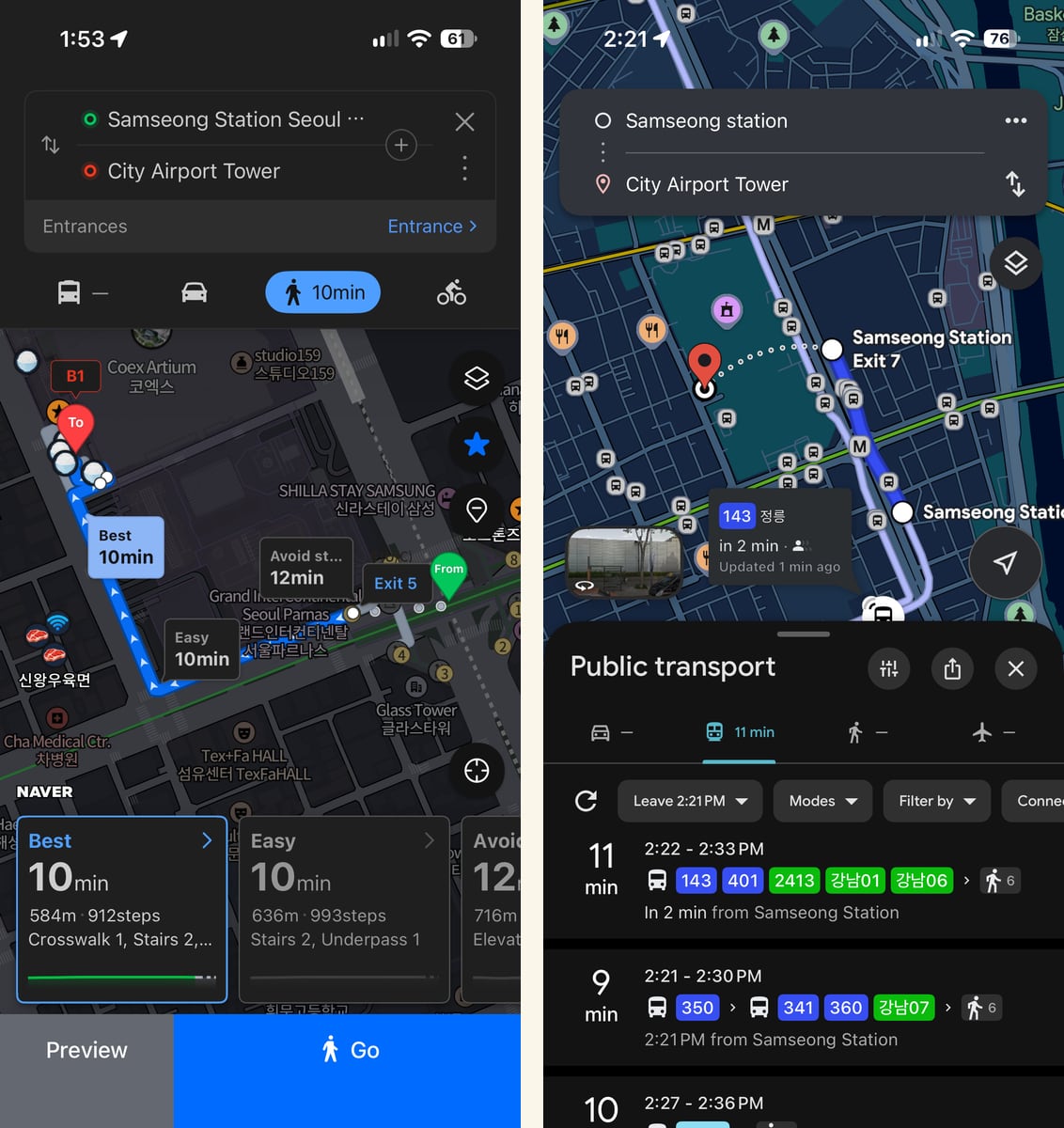
Use Naver Map as your main map in Korea, and keep Google Maps as a backup. On October 18, 2026, Naver Map gave me a 10-minute walking route from Samseong Station Exit 5 to City Airport Tower across from COEX, while Google Maps in English offered buses only. Switch the language in your phone’s settings, and search by the Korean place name alone.
I live and work in Seoul, and Naver Map is the app I open every day: for the walk from the subway to my office near COEX, for saving restaurants, and for reading reviews. For this guide, I checked the same short trip in both apps on the same afternoon; in Google Maps, the walking and driving tabs showed no route at all.
Naver Map works in English, but it has two habits that trip up visitors. You switch the language in your phone’s settings, not inside the app, and you should search for a place by its name only, never by name plus full address. The rest of this guide shows each step with screenshots from my iPhone.
Naver Map vs Google Maps, side by side
| What we checked (Oct 18, 2026) | Naver Map | Google Maps |
|---|---|---|
| English menus | Yes (also Japanese and two kinds of Chinese) | Yes |
| Walking route, Samseong Station to City Airport Tower | 10 min, 584 m, from Exit 5, three route options | No route shown (”—”) |
| Public transport, same trip | Not offered for this short trip (”—”) | Bus routes, about 9–11 min |
On Google Maps, the driving tab for the same trip showed no route either (”—”). On the Naver Map side, two more things you will use: reviews translated by Papago, and a booking button on some place pages; both are covered below. I compared only these two apps here; KakaoMap, the other big Korean map app, is not part of this guide.
Switch Naver Map to English
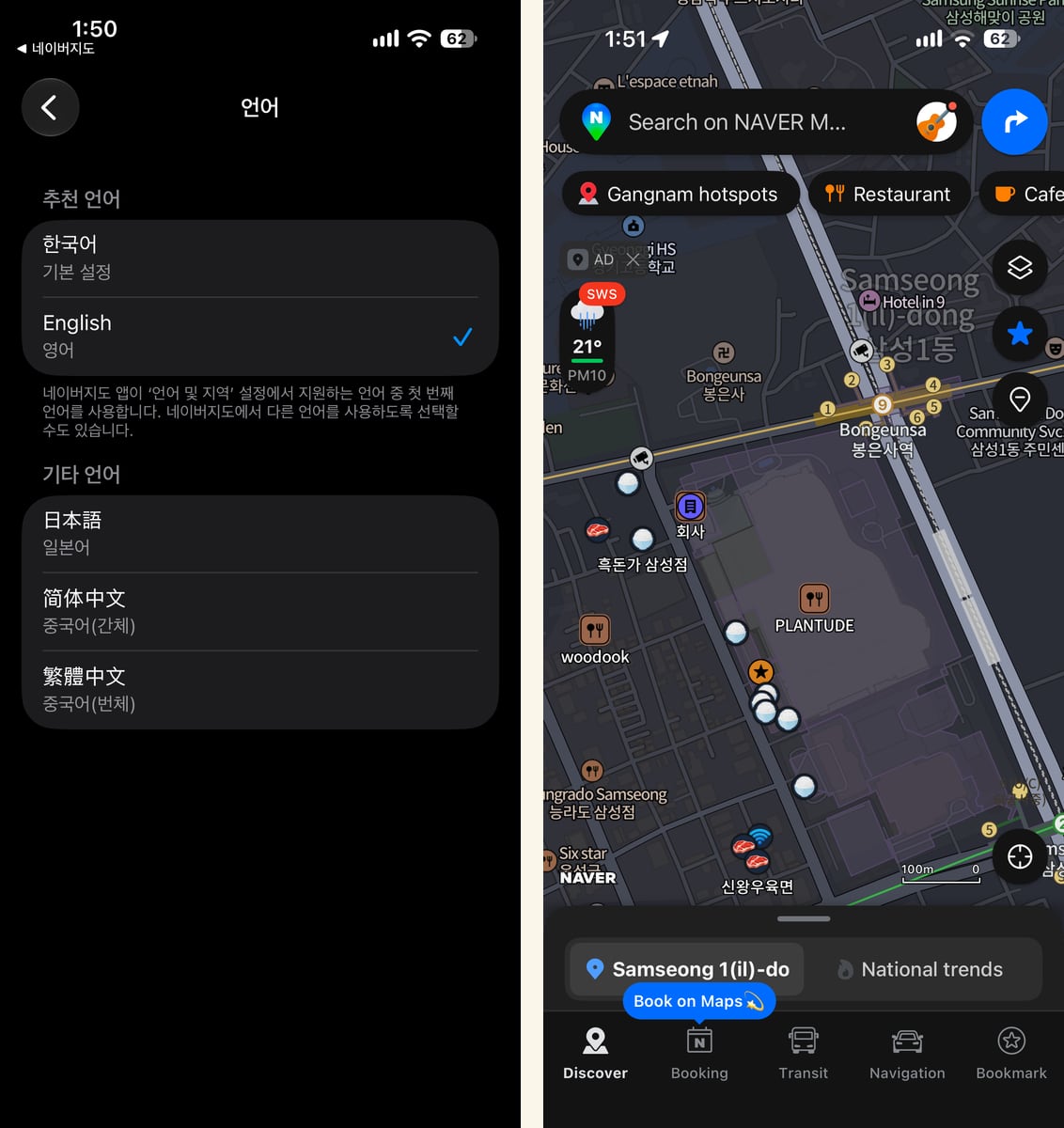 Left: the language page for NAVER Map in iPhone Settings (my phone is in Korean). Right: the Naver Map home screen after switching to English.
On iPhone, the language switch for Naver Map lives in the iPhone Settings app:
- Open Settings, then go to General > Apps.
- Find NAVER Map in the list and tap Language.
- Choose English. The other choices on my screen were Korean, Japanese, Simplified Chinese and Traditional Chinese.
The note on that page says the app uses the first supported language in your phone’s Language & Region settings, so if your iPhone is already in English, Naver Map may open in English without any change. Mine is in Korean, so I had to switch it here. After the switch, the search bar reads “Search on NAVER Map”, and the tabs at the bottom are Discover, Booking, Transit, Navigation and Bookmark. I only tested this on an iPhone, so I have not checked the steps on Android.
Search by name, not by full address
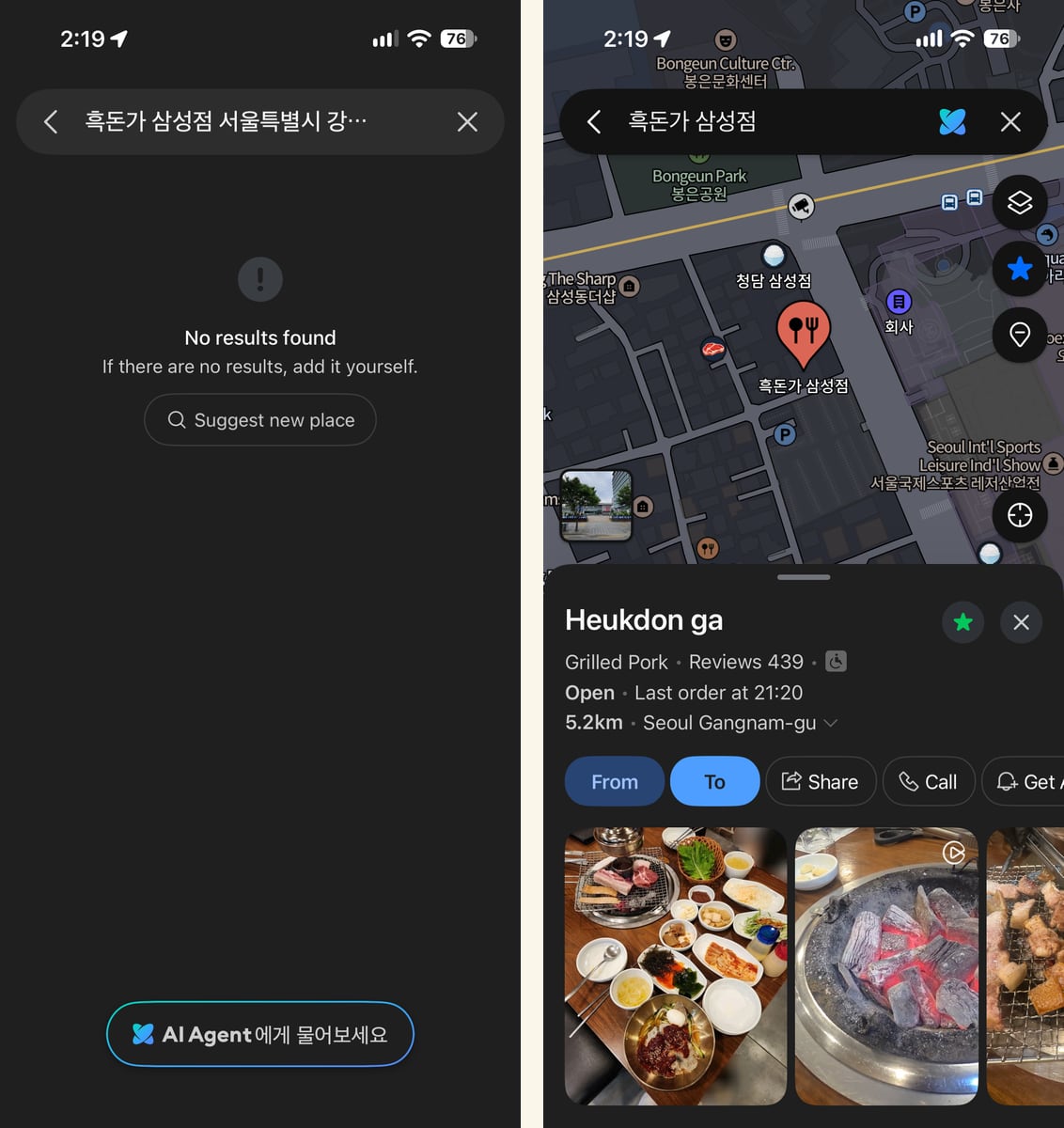 Left: restaurant name plus full Korean address, no results. Right: the name only, found right away.
This is the mistake I see most often. Naver Map is a search engine for places, and it gets confused when you paste a name and a full address together. I tested it with Heukdonga, a pork restaurant near my office:
- Name plus full address (흑돈가 삼성점 서울특별시 강남구 …): “No results found.”
- Name only (흑돈가 삼성점): a place card for “Heukdon ga”, Grilled Pork, 439 reviews, open, last order at 21:20, with From and To buttons for directions.
Notice that the English card spells the name “Heukdon ga”, while I write it “Heukdonga” on this site. Spellings of Korean names in English vary a lot, which is why pasting the Korean name is the safest search.
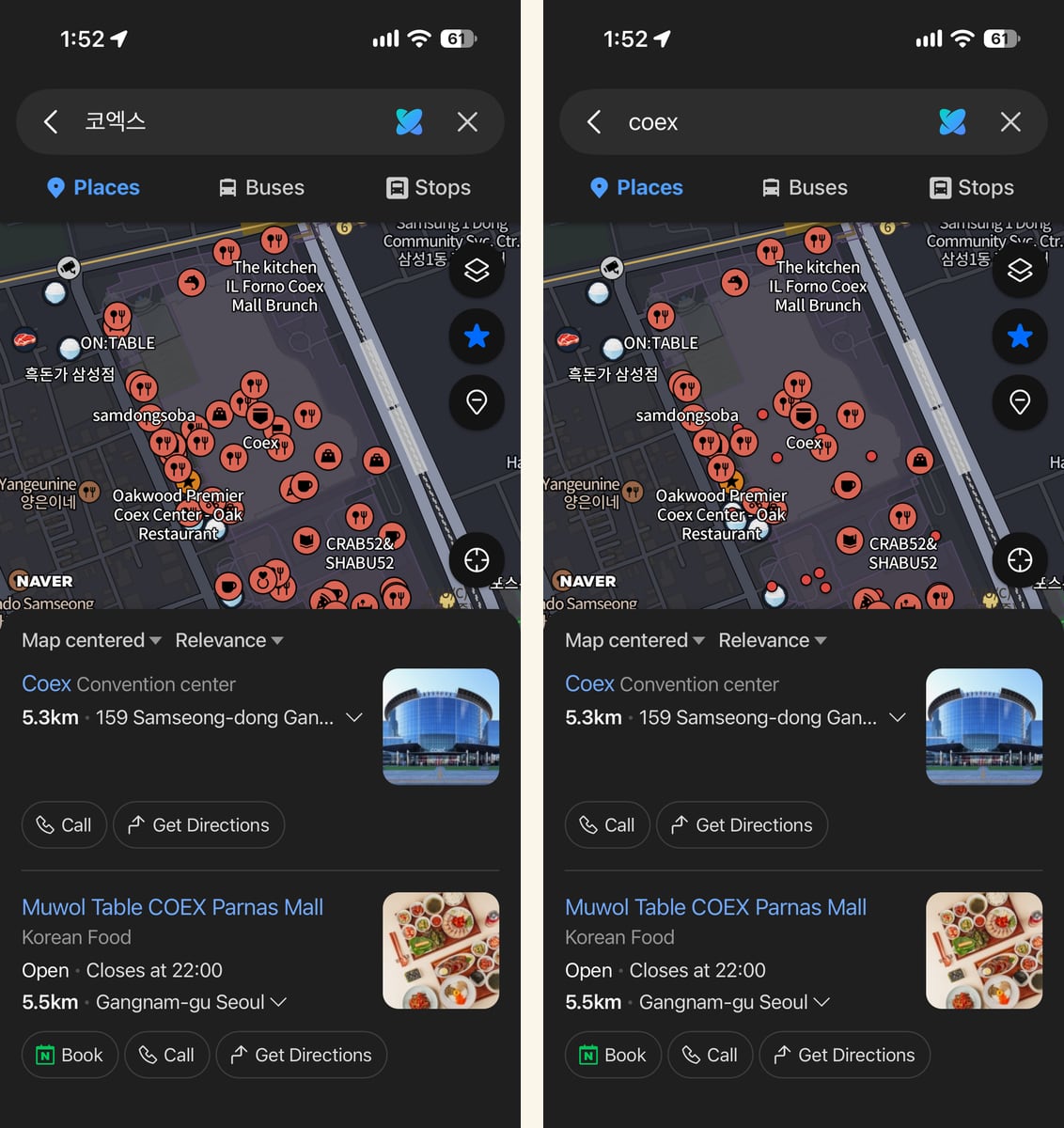 For a big landmark, English works too: “코엑스” (left) and “coex” (right) give the same results.
For big landmarks, English is fine. “코엑스” and “coex” gave me exactly the same list, with Coex Convention center at the top. For small restaurants, I would not count on it.
A shortcut for readers of this site: every review here has a Getting there box at the end with an “Open in Naver Map” button that searches the Korean name only, plus the Korean name and address written out. If the button does not open the app, copy the Korean name from that box and paste it into Naver Map’s search bar.
From the subway: exits and walking routes
Naver Map’s strength is the last few hundred meters. When I asked it for a route from Samseong Station to City Airport Tower, the building across the road from COEX where I often eat lunch, it showed:
- A starting point at Exit 5, marked on the map.
- Three walking options: Best, 10 min, 584 m (one crosswalk, stairs); Easy, 10 min, 636 m (stairs and an underpass); and a third, 12 min and 716 m, whose label was cut off on my screen (“Avoid st…”) and which lists elevators.
- A B1 tag on the destination, because the restaurants I was heading to are on the basement floor.
- An Entrances row at the top of the route screen.
For the same trip, Google Maps suggested taking a bus for one stop and walking the rest, and its walking tab showed only a dash. The trip is a 10-minute walk, so the bus is not wrong, but it shows the gap: in Korea, Google Maps still leans on public transport data and does not give its own walking route.
Why? Korean law has long restricted taking detailed map data out of the country, which limited Google’s walking and driving directions here. In February 2026, the Korean government conditionally approved Google’s request to export map data, according to TechCrunch. As of my October 18, 2026 screenshots, the walking and driving tabs were still empty. If that changes, I will update this guide.
Naver Map plans the trip, but you still need a way to pay. I tap a T-money card on the subway and buses.
Walking inside COEX Mall
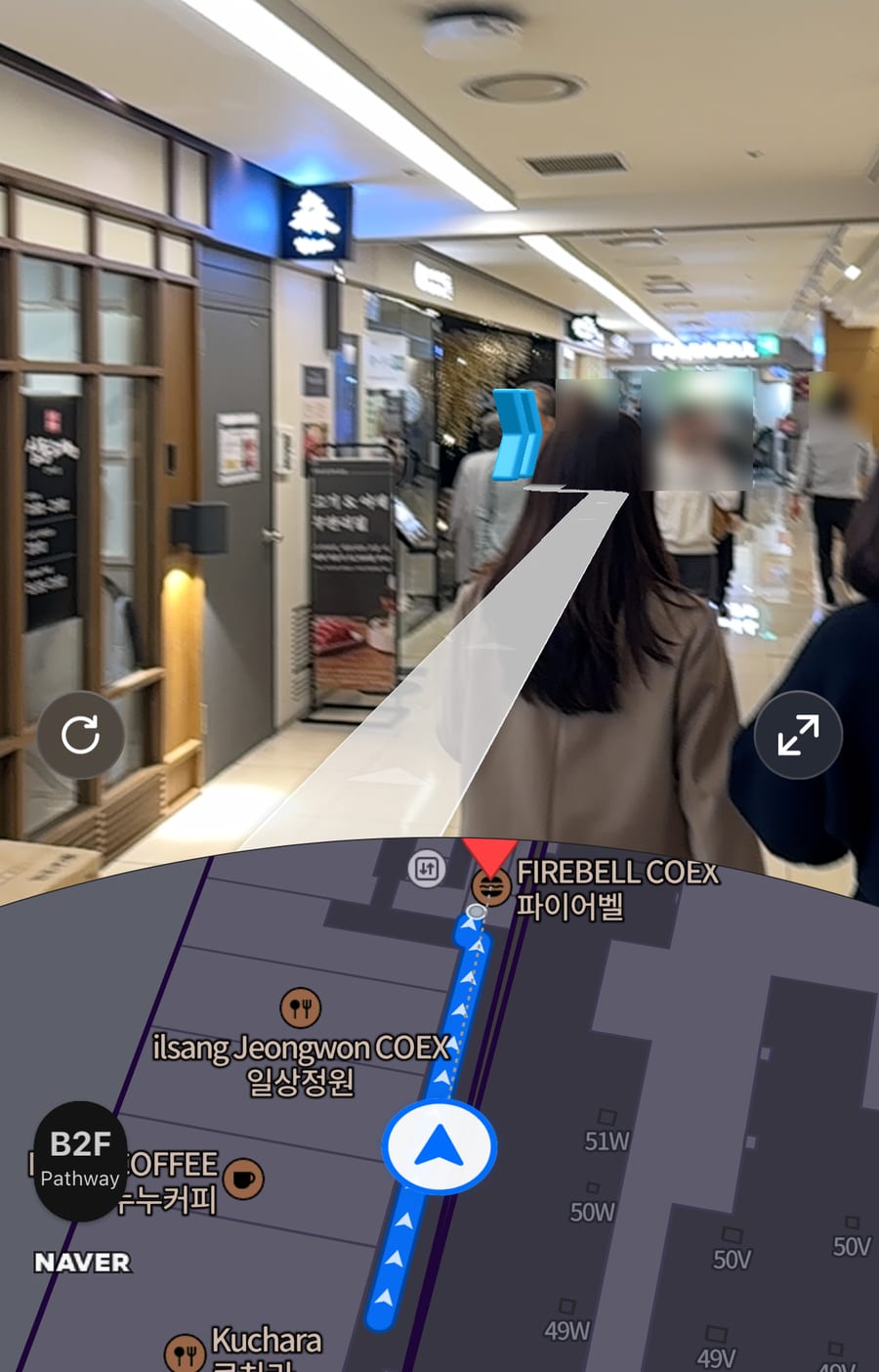 AR walking in COEX Mall, B2F. The path is drawn over the camera view, and the indoor map below names each shop in English and Korean.
Big underground malls are where Naver Map earns its place on my phone. COEX Mall is huge and easy to get lost in, and Naver Map’s AR walking directions, which point the way over your camera view, have helped me find restaurants inside it. In the screenshot above, taken on B2F, the route is drawn on the floor ahead of me, and the indoor map at the bottom shows the floor (B2F) and the restaurants I am passing, with English names such as FIREBELL COEX above the Korean ones. I will not walk you through every button, but the idea is simple: hold up your phone and follow the line. For where to eat once you get there, see my guide to where to eat near COEX.
Save places like a local: lists
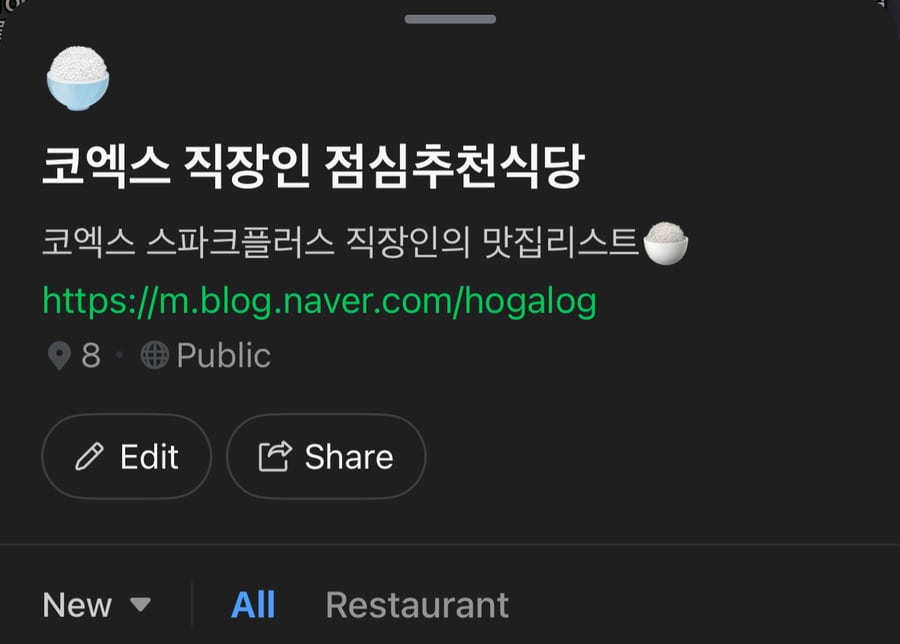 My public Naver Map list of COEX lunch spots. The Share button gives you a link.
This is how I plan every trip. When I see a restaurant or cafe on Instagram or in a newsletter, I save it to a list in Naver Map. On a trip to Jeju, that saved list did most of the planning: when we needed a cafe on the way to our next stop, I opened the list and we picked one from it. That is how we ended up at Slowboat Atelier.
Each list can be public or private, and the Share button creates a link. Here is one of mine, the places I actually go for lunch near my office at COEX (the list name and notes are in Korean):
I have not tested how a shared list opens on a phone without a Naver account, so if the link asks you to log in, use it as a reading list and search the names yourself.
Read reviews in English
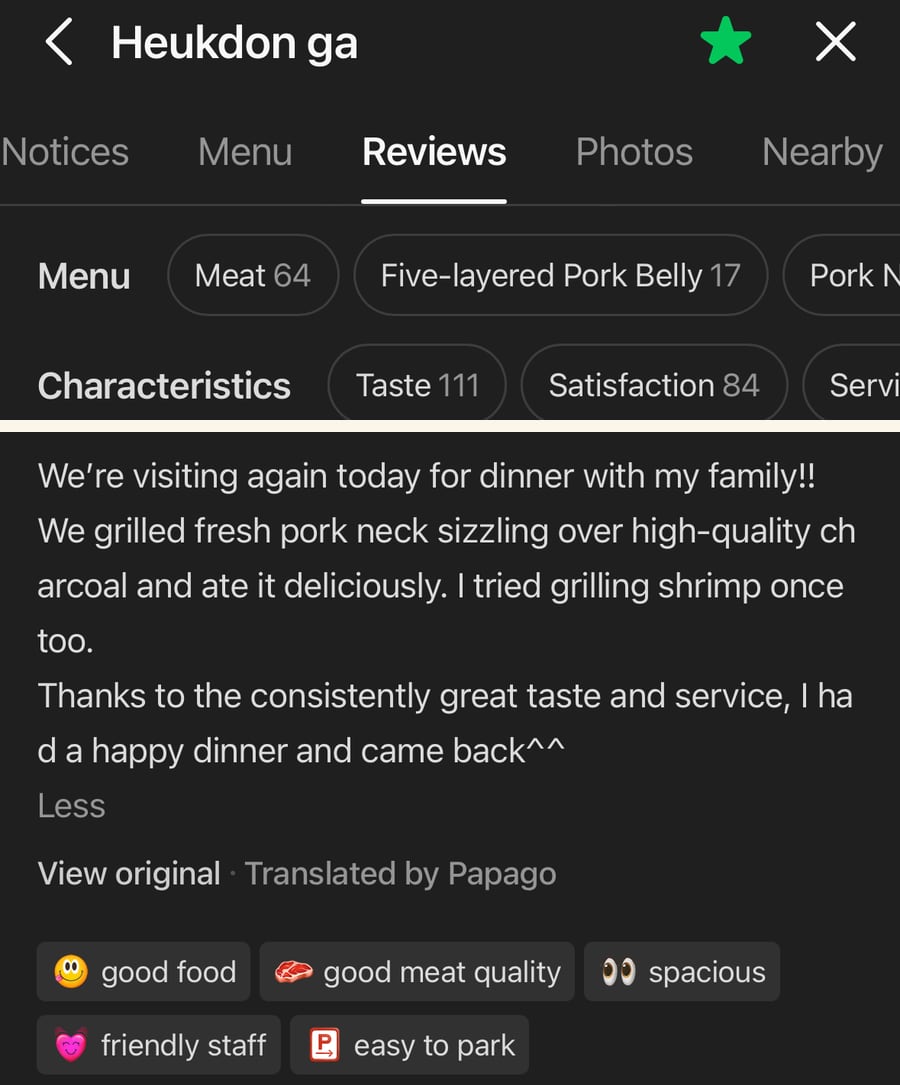 The Reviews tab in English mode. The review text is another user’s, machine-translated by Papago.
With the app in English, a place page’s Reviews tab shows Korean reviews in English. Each translated review has a “View original” link and the note “Translated by Papago”, Naver’s translation service. Above the reviews, there are filter chips by menu item and by characteristic, such as taste and satisfaction, each with a count. Under each review, keyword tags such as “good food” and “easy to park” summarize it. Naver says it expanded translation of visitor reviews in its December 2024 announcement for foreign visitors.
The translations are machine translations, so read them for the gist. The tags and chip counts are often more useful than the sentences: if “easy to park” or a dish name shows up a lot, that tells you something.
Booking and passport verification
Some place cards in Naver Map have a Book button, and the home screen has a Booking tab. Korean press reported that from June 4, 2026, Naver lets visitors verify their identity with a passport issued abroad, without a Korean phone number, to use booking, ordering and payment on Naver Map. I use a Korean account, so I could not test this myself, and I do not know whether every restaurant accepts these bookings. In my own reviews, most places did not need a booking at all.
Two things that catch visitors out
- Not everything turns English. In English mode, many map labels stayed in Korean only (the restaurant pins near my office, for example), and the “AI Agent” button at the bottom of the search screen was still in Korean.
- Distances are from where you are. In my searches, the distance on each result was measured from my current location, not from the area on the map. For a real route, set the start point with the From and To buttons.
Related
- Where to Eat Near COEX, Seoul: 12 Restaurants We Paid For
- Heukdonga Samseong: Weekday Lunch at a 400-Seat Pork House
- Eating Alone at COEX, Seoul: 3 Solo-Friendly Lunch Spots
- Seoul Kkakdugi COEX: Seolleongtang Near Samseong Station
- Slowboat Atelier Jeju: A Quiet Ocean View Cafe in Aewol
Sources: Naver’s visitor guide to Naver Map (mkt.naver.com/navermapapp) and its December 30, 2024 press release; TechCrunch, February 27, 2026 on Google Maps data export; Asia Economy, June 9, 2026 on Naver passport verification. All screenshots: my iPhone, October 18 and 19, 2026.
My Korean blog, with more Seoul reviews: 호갈로그 on Naver